
Before you start
Make sure you have:- a running Rudder instance
- an organization where you can create or edit agents
- the local CLI, script, gateway, or webhook you want Rudder to invoke
- credentials already installed on the same host that runs Rudder
What runtime configuration controls
There are three related pieces of configuration:| Field | What it controls | Example |
|---|---|---|
agentRuntimeType | Which backend Rudder invokes for heartbeats | codex_local, claude_local, process, http |
agentRuntimeConfig | Backend-specific settings | model, instructions file, command, URL, headers |
runtimeConfig | Rudder scheduling and workspace behavior | heartbeat cadence, budgets, workspace settings |
agentRuntimeConfig. Change runtimeConfig only when you are configuring how Rudder schedules or hosts the agent, not which executable or endpoint runs the work.
Choose a runtime
| Runtime | Use it when | Required setup |
|---|---|---|
| Codex (local) | The agent should work in local repositories through Codex | Codex installed and authenticated on the Rudder host |
| Claude Code (local) | The agent should use Claude Code for local operator or repo work | Claude Code installed and authenticated on the Rudder host |
| Gemini, OpenCode, Pi, or Cursor local | You want one of those local CLI-backed agents | The matching CLI installed and authenticated |
| Shell Process | You have a custom script, wrapper, or internal runner | An executable command and optional arguments |
| HTTP Webhook | Your runtime is an external service | A reachable http:// or https:// endpoint |
| OpenClaw Gateway | You run agents through an OpenClaw gateway | A reachable gateway URL and any required token/session settings |
Configure a local CLI runtime
Use a local CLI runtime for Codex, Claude Code, Gemini CLI, OpenCode, Pi, or Cursor-backed agents.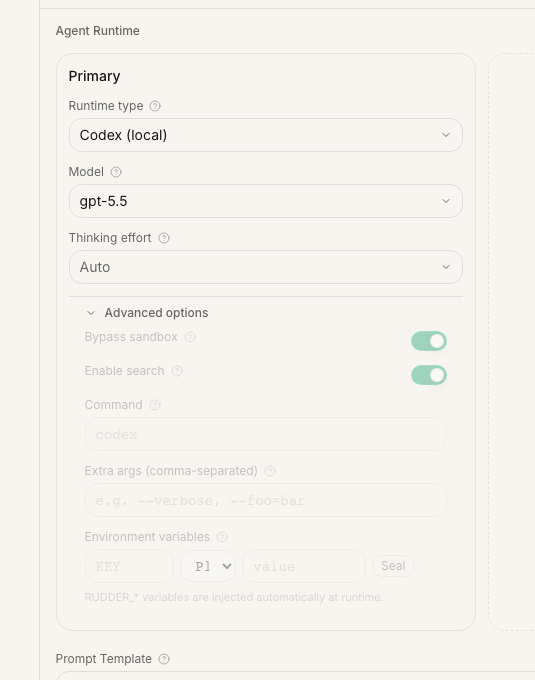
- Create or edit an agent.
- Choose the runtime type.
- Select a model when the runtime exposes model selection.
- Add an agent instructions file if this agent needs a role-specific markdown file.
- Configure runtime-specific options.
- Run the environment test.
- Assign the agent a low-risk issue and run one heartbeat.
AGENTS.md files may still be applied by Codex itself when the agent works inside that repository.
Codex-specific options include web search and sandbox bypass. Enable search only when the agent should use web results during runs. Enable sandbox bypass only for trusted local work that needs broader filesystem or network access.
Claude Code options include Chrome access, permission behavior, and max turns per run. Keep these tight for routine work; loosen them only when the agent needs that capability.
Configure a shell process runtime
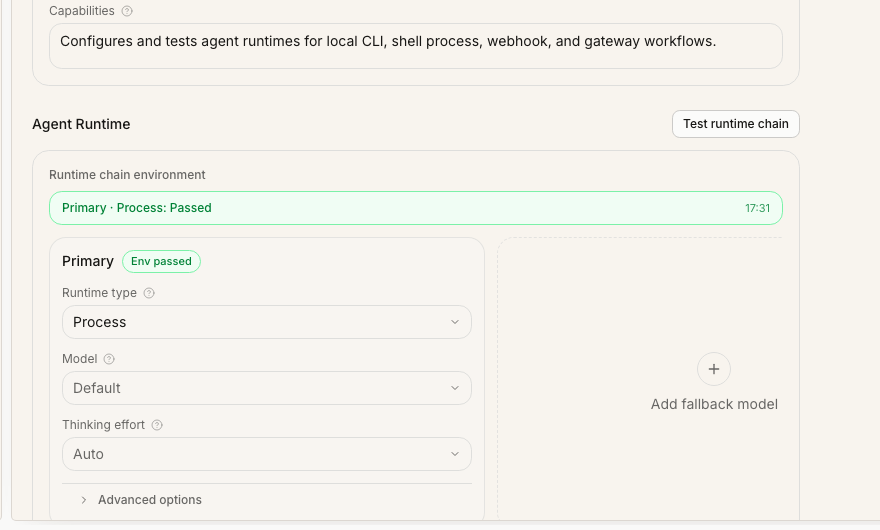
Use Shell Process when you already have a script or wrapper that can run one agent work cycle. In the agent form, set:| Setting | Meaning |
|---|---|
command | Executable to launch, such as node, python, or an absolute binary path |
args | Arguments passed to the command |
cwd | Working directory for the process |
timeoutSec | Optional run timeout in seconds |
graceSec | Optional shutdown grace period |
env | Optional string environment variables passed to the process |
commandis presentcwdis an absolute directory- the command is resolvable from the configured working directory and
PATH
Configure an HTTP webhook runtime
Use HTTP Webhook when your agent runs outside the Rudder process, such as a hosted service, queue worker, or internal orchestration layer. Minimum configuration:headers and payloadTemplate.
At invocation time, Rudder sends a JSON body that combines your payloadTemplate with the agent id, run id, and Rudder run context:
HEAD probe. A failed probe may be a warning instead of a hard failure if the endpoint blocks HEAD, but the first real heartbeat should still be verified from the run transcript and your service logs.
Configure an OpenClaw Gateway runtime
Use OpenClaw Gateway when Rudder should hand execution to an OpenClaw-compatible gateway. Important settings include:| Setting | Meaning |
|---|---|
| Gateway URL | WebSocket endpoint, for example ws://127.0.0.1:18789 |
| Payload template | JSON merged into the gateway payload |
| Runtime services | Optional service wiring for the gateway |
| Rudder API URL override | Public Rudder API URL if the gateway cannot reach the default |
| Session strategy | Fixed session, per issue, or per run |
| Gateway auth token | Stored as x-openclaw-token header |
| Role and scopes | Gateway-side authorization context |
| Wait timeout | How long Rudder waits for gateway completion |
Test and iterate
Use the built-in environment test before assigning real work. It catches missing commands, invalid working directories, malformed URLs, and basic connectivity problems. A passing environment test is not the final proof. It only means Rudder can plausibly launch or contact the runtime. The real proof is one heartbeat that leaves inspectable evidence:- the run starts under the expected runtime
- transcript entries or raw output appear on the run
- the issue receives a progress, blocked, review, or done signal
- the agent does not need credentials or permissions that only exist in your interactive shell
Operational checklist
Before you rely on the runtime for recurring work, confirm:- the agent role and capabilities are clear
- the runtime is installed on the same host that runs Rudder
- the runtime is authenticated outside the docs repository
- model and instruction settings match the work
- broad permissions are enabled only for trusted agents
- the environment test passes, or each warning is understood
- the first real heartbeat leaves transcript or issue evidence
Next steps
Agents
Review the agent model and heartbeat loop.
First organization
Hire your first agent in a new Rudder organization.
Issue lifecycle
Learn how runtime work should close out on issues.
Skills
Package reusable instructions for agents.