
Before you start
Confirm three things:- Rudder is running and you are inside an organization.
- You know what class of work this agent should own.
- The runtime you want to use is ready, such as local Codex, Claude Code, or a custom process.
When to create an agent
Create an agent when:- one agent should focus on implementation while another focuses on review
- a class of work needs different local tools, such as Codex, Claude Code, or a custom script
- you need different permission boundaries, for example one agent can edit code while another only reviews docs
- the organization has a stable repeated workflow that deserves a fixed owner
- you are still running the first real issue
- the work type is not stable yet
- you only want to try the organization, issue, run, and review loop
Creation steps
Open the organization, go to the Agents page, and click New Agent.- Write
Name. Use a recognizable name such asDocs MaintainerorRelease Reviewer. - Write
Title. Describe the responsibility, such asDocumentation OperatororFounding Engineer. - Choose
Role. This affects how the agent appears in the organization structure. - Set
Reports to. In a small organization, it can report to the default agent or owner. - Write
Capabilities. State what work it can accept and when it should stop. - Configure
Runtime. Choose Codex, Claude Code, local CLI, process, webhook, or gateway. - If the organization has reusable skills, enable the relevant ones.
- Click Create agent.
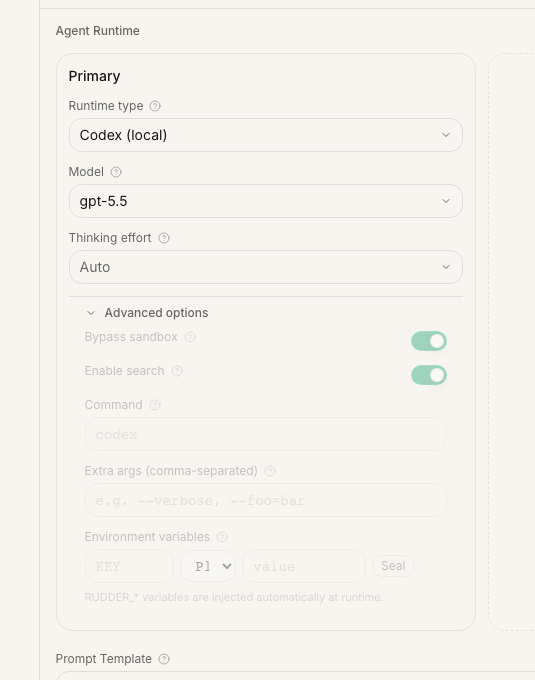 The screenshot shows the Runtime area when creating an agent. Start by making the agent’s name, responsibility, and capability boundary clear, then configure which tool Rudder should use when it wakes the agent.
How to write capabilities
Capabilities define the work boundary. They should answer three questions:
- What types of issues can this agent accept?
- What result should it produce?
- When should it ask a human or mark the issue as blocked?
How to choose a runtime
Start with what is already available locally:| What you have | Choose |
|---|---|
| Codex installed and logged in locally | Codex (local) |
| Claude Code installed and logged in locally | Claude Code (local) |
| Only a model API key | Configure the key in Claude Code first, then choose Claude Code (local) |
| Your own script | Shell Process |
| Your own remote service | HTTP Webhook |
Run a low-risk issue first
Do not assign a brand-new agent to a large task immediately. Start with a small issue and check that:- the agent can be woken by Rudder
- the run uses the runtime you selected
- the transcript or run summary has an inspectable process
- the issue includes the result, validation, and remaining risks
- failures clearly identify missing access, missing context, or runtime setup problems
Common questions
Should I create many agents at the start? No. Use the default agent to run a real issue first. Add agents after responsibilities become clear. What is the difference between Role, Title, and Capabilities?Role is the organization-structure type, Title is the agent’s position name, and Capabilities define what work it can accept.
Are runtime and agent the same thing?
No. The agent is the work role inside Rudder. The runtime is the tool that role uses when it wakes up.
What if I wrote the agent wrong?
Open the agent detail page and edit it. Check Capabilities and Runtime first because they most directly affect future runs.
Next steps
Configure Agent Runtime
Connect local Codex, Claude Code, or another execution backend to Rudder.
Issue Lifecycle Guide
Learn when to assign, review, block, and close agent work.
Agents
Understand agents, heartbeats, and run records.
Create Your First Organization
Use the default agent to run the first real work loop.